
Minecraft Inventory Redesign
Redesigned Minecraft's inventory system to improve organization, accessibility, and scalability.

Role
-
UX/UI Designer
-
UX Researcher
Timeline
-
Nov 2024
Tools
-
Figma
-
Google Forms
Process
-
Discover
-
Define
-
Develop
-
Deliver
-
Reflection
Project Overview
Minecraft’s inventory was built for a much simpler version of the game, and over time its limitations have become more noticeable.
For this academic UX project, I had 1.5 weeks to identify pain points in Minecraft’s current inventory experience and design a solution that could better support future updates.
Drawing from research, testing, and my own experience with inventory-focused mods, I explored ways to improve organization, item access, and scalability while keeping the system simple and familiar for existing players.
Problem
Minecraft’s inventory system does not scale well with the game’s growing number of items.
With limited sorting tools, unclear recipe discovery, and weak visual hierarchy make item management slow, unintuitive, and frustrating for players.
Design Goal
To develop a future-ready, flexible, and player friendly inventory system that helps all player types.
This is what Minecraft's current inventory looks like

Picture of my Minecraft inventory
Discover
Competitive Research & Analysis
I interviewed Minecraft players and researched three competitive games to better understand inventory pain points and possible solutions.
After reviewing player feedback, I identified common habits, frustrations, and needs, then compared how other games approach sorting, filtering, organization, and item access.
User Interviews
To understand the current inventory experience, I interviewed 10 casual and avid Minecraft players about how they organize, store, and find items.
The interviews focused on their experiences with inventory management, chest storage, and the crafting book, as well as any tools or mods they use to make managing items easier.
Some of the questions I asked included:
-
What do you find most frustrating about the current inventory system?
-
How do you feel about managing items between your inventory and chests?
-
Have you used any third-party tools to improve inventory management? What features did you like?
-
How do you feel about the way recipes are organized in the crafting book?
-
Does the crafting book help you craft items faster? Why or why not?
"I wish I had more control over organizing my inventory and chests. Especially, with a game with that often adds new items."
- User A
"The inventory could be better organized better, I wish I had more control over this.” - User B
Key Findings
I found that the current inventory system has some benefits. It’s simple and easy for new players to use, and the layout is familiar to long-time players, making it comfortable to navigate.
However, there are some issues with the system. There aren’t many options to organize items, which can lead to clutter. There are also no tools to sort or filter items quickly. The recipe book is page-based, which makes it slow to navigate, and only shows twenty items at a time, making crafting less efficient.
3 Competitors - Diablo IV, Rust, ARK: Survival Evolved
After combing through the results, I decided to do further research by finding games that I can reference to find solutions to these issues.
Diablo IV
-
Uses a grid to organize items, making them easy to manage
-
Items do not stack
-
Frequently used items are easily accessible by filtered and sorted tabs
-
Limited inventory encourages strategic item management

Rust
-
Has a dynamic toolbar for easy item switching, more flexible than Minecraft's fixed hotbar
-
Hover-over tooltips for detailed item info, improving usability
-
Easier item transfer between containers, reducing tedious inventory management

ARK: Survival Evolved
-
Allows item sorting by type, helping organize inventory more efficiently
-
It features item filtering by category, making it easier to find specific items
-
Quick access slots allow faster item retrieval.
-
Larger storage containers help manage bigger inventories and group items better

Define
Player Types and Pain Points
Different playstyles created different inventory needs, but many of the same frustrations appeared across players.
I grouped these insights into player categories and recurring pain points to clarify which problems were most important to address in the redesign.
User Analysis
After the user interviews, I found that Minecraft players have different goals and inventory habits. I created four common player types based on these patterns to better understand their needs.

User Pain Points
From my interviews and observations, I found that players often organize items around their own playstyle, revealing key issues with organization, accessibility, and scalability.
Limited Organization Options:
-
Challenges for players with different needs
Accessibility:
-
Hard to find items, especially for new players or specialized tasks
Scalability Issues:
-
Minecraft's inventory was originally designed to hold a fixed set of items

Players naturally group items based on their current goals and playstyle, creating their own system within the limited inventory space.
This example shows how a player might organize their inventory for survival gameplay.

Develop
Wireframes
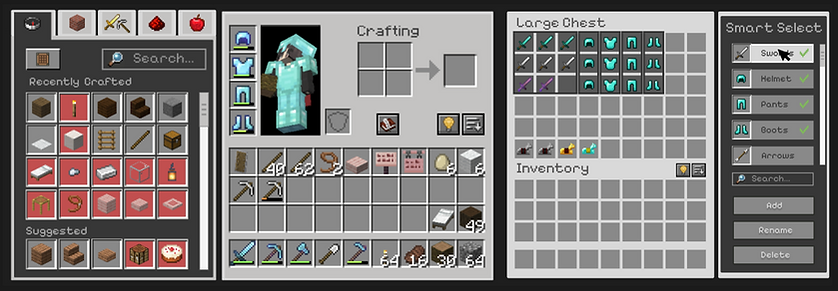
In this proposed redesign, I focused on improving the overall quality of life for players, making both the inventory and crafting book more intuitive, efficient, and customizable. The key areas of improvement include:
˗ˏˋ Quality of Life Features ˎˊ˗
-
Searching
-
Filtering
-
Streamlined Inventory and Recipe Book
Smart Select

I came up with a customizable filtering tool, called Smart Select. That allows players to organize their inventory based on their preferences.
Players can filter items by type or group together items using tags

Recipe Book
The crafting book was redesigned to improve clarity and accessibility. Users often struggled to understand the purpose of the crafting book, so I made several adjustments to make it more intuitive and based off their feedback:
-
The craftable button now turns green (active) or red (inactive), making it clear whether a player can craft an item or not
-
The first page now includes Recently Crafted and Suggested sections to make it easier for players to quickly access items they've recently used or items they might need next
-
I replaced the axe to a pickaxe icon on the tools tab
-
Added a scrollbar instead of flipping pages

Deliver
High-Fidelity Wireframes
I translated the key needs around organization, accessibility, and scalability into high-fidelity wireframes, refining the layout and interactions while keeping the system familiar to Minecraft players.
Final Design
Follow Up User Interviews
After finalizing the wireframes, I evaluated whether the redesign addressed the original pain points.
Then I presented the final inventory system to the same ten participants and gathered qualitative feedback.
Direct quotes from Users


What I Learned
This redesign challenge taught me a lot about how players use inventory and crafting systems. One important lesson was realizing that even simple features like the sort and smart select buttons need to be clearly explained, especially for new players. Some users suggested adding tooltips or short tutorials to make these features easier to understand. I also learned that the recipe book needs more flexibility.
As the game grows, having just five categories can make it hard to find specific items. Players would appreciate having more categories or ways to customize the organization. This experience showed me how important it is to keep testing and adjusting designs to make sure they work well for all players, no matter how experienced they are.