Astro Odyssey
UX/UI Game Design
Designed the UX/UI and levels for a short puzzle game, refining the game's interface, mechanics, and puzzles through iteration.
Role
-
UX/UI Designer
-
UX Researcher
-
Level Designer
- Team of 8
Timeline
-
Aug - Apr 2024
Tools
-
Figma
-
Unity
-
Tiled
-
PixilArt
Process
-
Discover
-
Define
-
Develop
-
Deliver
-
Reflection
Project Overview
For this project, I built on my previous experience with sci-fi games while collaborating with an eight-person team to develop a 2D top-down shooter.
This 2D top-down sci-fi shooter was developed during my sophomore year as part of an 8 person team. Before this project, I had already worked within the sci-fi genre on Starflight Commando, a 2D side-scrolling space shooter. I was able to build on what I learned from that experience and apply those skills to a larger team project with a different gameplay perspective.
Problem
How might we create a clear and consistent player experience while working across multiple disciplines?
With designers and programmers working on different parts of the game at the same time, we needed to keep the UI, levels, and gameplay consistent and easy to build.
Design Question
How might we create a clear and cohesive player experience while balancing UI, level design, gameplay, and technical constraints?
Discover
Player Goals and Needs
The next step was turning the core gameplay into interactions players could read at a glance.
I focused on UI, pickups, and level cues that helped players recognize important information, understand what objects did, and move through each space with less confusion.
Clear Pickups
Make keys and weapons easy to recognize during gameplay so players understand their purpose without needing help.
Readable UI
Organize information with clear hierarchy, spacing, and visual consistency so players can quickly understand important actions and game states.
Guided Level Flow
Design rooms that naturally guide players toward objectives, combat encounters, and progression points without relying heavily on text.
Design Criteria
-
What information should always be visible?
-
What should stand out immediately?
-
What can be communicated visually instead of with text?
-
How should players know where to go next?
Develop
Low Fidelity Wireframes & Early Prototyping
I used early design and prototyping to define how players would interact with the game and understand important information.
I explored the menus and HUD through low-fidelity wireframes, designed supporting UI screens, and built Unity prototypes for keys, locked doors, and weapon pickups to test how these interactions would work during gameplay.
Key & Locked Door Mechanics with Gun Pickups
I prototyped key, locked door, and weapon pickup mechanics in Unity to define how they would work in our custom engine.
I focused on making each interaction clear at a glance, with keys naturally tied to locked doors and weapon pickups designed to stand out as important items.
User Interface
I started with low-fidelity wireframes to explore the structure and flow of the HUD and core menu screens.
These early layouts helped me decide what information each screen needed, how players would move between menus, and which elements should receive the most attention.
Low Fidelity Wireframes

Head-Up-Display (HUD)
Working with another UX designer, I explored three HUD designs and tested them during gameplay to compare clarity, layout, and usability.
Feedback from playtesting helped us refine the direction and select the third prototype for its simple, readable layout. Since the game initially used a limited pickup system, this design gave us a clear foundation that could scale as more functionality was added.

Prototype 1
I created an initial inventory prototype with four slots, each featuring an 'X' indicator to signal that an item could be dropped (bottom middle).
This was a conceptual design to establish the basic layout and functionality of the system.
Prototype 3
Prototype 3 focused on a single item pickup, batteries.
However, the key and locked door mechanic was removed to streamline gameplay, and since only one weapon was available, it was no longer necessary to display it.
As a result, the final prototype for the inventory was simplified to a single main slot to represent the player's items.

Prototype 2
I removed the 'X' indicators based on player feedback.
The team decided that items intended for use would be automatically removed from the inventory, eliminating the need for manual item drops.
Player Onboarding - Navigation Companion
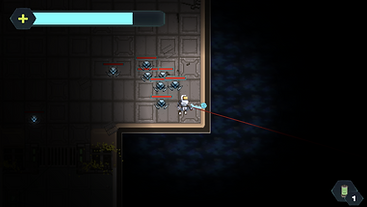
I helped develop the navigation companion by writing tutorial dialogue and creating supporting animations.
The dialogue provided clear, contextual guidance based on the player’s progress, while the animations highlighted key moments and made the tutorial feel more naturally integrated into gameplay.
Dialogue Purpose:
-
Guide Player
-
Provide Contextual Clues
Level Design - Rooms
I designed two rooms in Tiled to explore combat flow, navigation, and player progression.
Through playtesting, we found that parts of the layouts made traversal and guidance unclear.
Room 1

Room 2
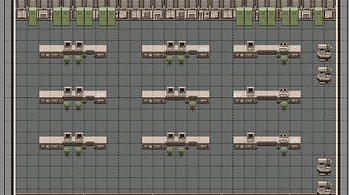
The design team decided to rework the level direction, which ultimately led to these rooms being cut.
Even though they did not make it into the final game, the process helped me better understand how playtesting can reveal issues that are difficult to catch, and when removing or reworking a design is the better choice for the player experience.
Deliver
Final Prototype
The final experience brought together the UI, gameplay interactions, and tutorial elements developed throughout the project.
My work contributed to the HUD and menu direction, key and weapon pickup interactions, and tutorial guidance through dialogue and animation. Each part was refined to help players understand important information and interactions more quickly during gameplay.
Final UI Screens

What I Learned
This project taught me to be more flexible with my design decisions and more comfortable letting go of ideas that were not working.
Working closely with both designers and programmers helped me see how much communication, feedback, and iteration shape the final experience. It also gave me more confidence in balancing creative ideas with technical limitations and making decisions based on what works best for the player.